This message will be pre-filled in the chat. The user can edit it before sending.
The WiFi name exactly as it appears on devices. Case-sensitive.
Leave empty for open networks.
Choose the encryption your router uses. Most home networks use WPA/WPA2. Newer routers may support WPA3.
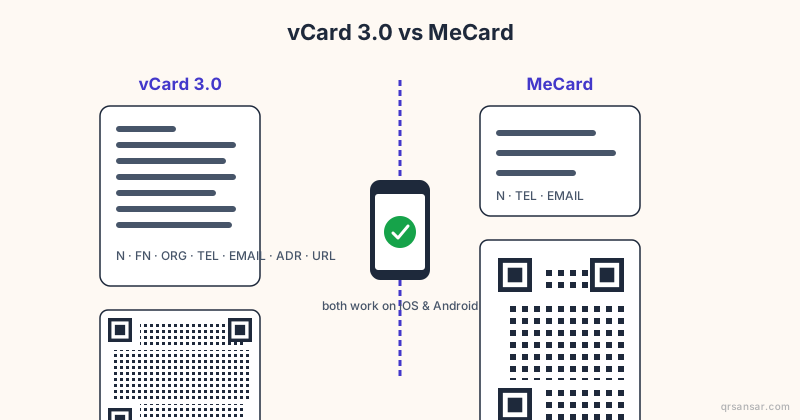
Create a digital business card. Scanning adds the contact directly to the phone. Only name is required — everything else is optional.
Create a calendar event. Scanning adds the event to the phone's calendar app.
End time must be after the start time.
🍎 App Store QR — links directly to your iOS or macOS app listing. Scanning on iPhone opens the App Store. On Android it opens in the browser. Need one QR for both platforms? Try Smart Link.
📲 Google Play QR — links directly to your Android app listing. Scanning on Android opens the Play Store. On iPhone it opens in the browser. Want iOS support too? Try Smart Link.
Paste the full link to your app listing.
🔀 Smart Link — iOS users go to the App Store, Android users go to Google Play, and desktop visitors see a download page with both badges. Must be saved as a Dynamic QR.
Smart Link must be saved as a Dynamic QR — log in to continue.
Shape of the data pixels.
Shape of the 3 finder patterns.
Inner dots inside corners.
Overall shape of the QR code.
Pre-styled designs for specific use cases. Applies colors, shapes, frame & CTA in one click.
One-click color themes. You can further customise after picking a preset.
Keep strong contrast between foreground and background for reliable scanning.
#000000
100%
#000000
100%
#000000
100%
#ffffff
100%
Place a logo at the center of the QR code. Error correction is automatically set to High when a logo is added.
Từ một nút phản hồi cạnh bình xà phòng ở sân bay Bangkok, đến hộ chiếu tê giác gắn QR ở Kruger, đến một vườn nho Mendoza được quét tại một nhà hàng ở London — một thư viện ngày càng lớn các địa điểm thực tế nơi QR đang lặng lẽ làm việc.
✨Câu chuyện trong ngày
🇺🇦
Ukraine · Kyiv to the front lines
An ID that fits in a pocket, even when the office doesn't exist
Ukraine's Diia 'state-in-a-phone' app issues QR-coded digital IDs for driving licences, internal passports, vaccination records, and property documents. Physical government offices have burned, been occupied, or simply lost power. The IDs stayed on citizens' phones and kept working wherever their owners went.
Không. Mã QR tĩnh được tạo trong trình duyệt của bạn và không bao giờ hết hạn — chúng hoạt động mãi mãi. Mã QR động liên kết với tài liệu đã tải lên vẫn hoạt động miễn là tài khoản của bạn còn hoạt động.
Is QRSansar free to use?
Yes. All QR code types and customization options are 100% free. Download as PNG, JPG, or SVG with no sign-up. A free account (no credit card) unlocks PDF and WEBP downloads, logo uploads, dynamic QR codes, and up to 10 document uploads. Premium adds bulk generation and analytics.
Tôi có thể thêm logo vào mã QR không?
Có. Tải lên bất kỳ logo PNG hoặc SVG nào trong bảng tùy chỉnh. QRSansar tự động điều chỉnh sửa lỗi để mã vẫn có thể quét được.
Tôi có thể tải xuống ở định dạng hình ảnh nào?
PNG, SVG, PDF và WEBP. SVG lý tưởng để in — nó co giãn ở mọi kích thước mà không bị mờ.
Tôi có thể cập nhật mã QR sau khi in không?
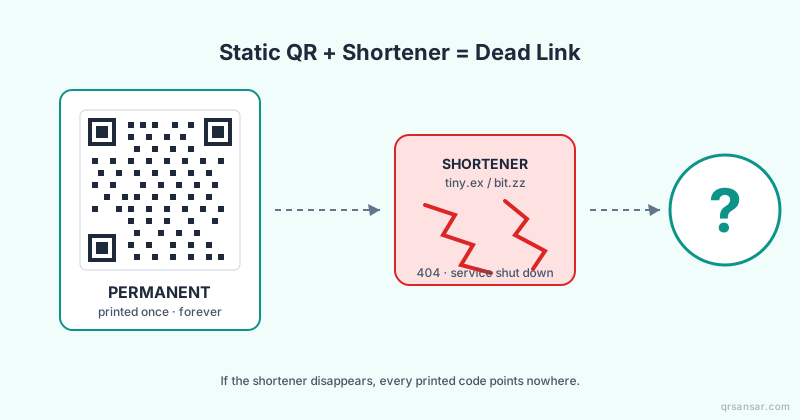
Với QR Tài liệu, bạn có thể thay thế tệp bất cứ lúc nào — liên kết được in vẫn giữ nguyên. Mã QR tĩnh mã hóa dữ liệu trực tiếp và không thể thay đổi sau khi tạo.
Mã QR của QRSansar có an toàn để sử dụng thương mại không?
Tuyệt đối. Không có hình mờ, hạn chế hay phí. Mã QR bạn tạo là của bạn để sử dụng tự do cho bất kỳ mục đích nào.
Chúng tôi sử dụng cookie để phân tích và cải thiện trải nghiệm của bạn. Tìm hiểu thêm
Luôn cập nhật!
Nhận thông báo về tính năng mới và cập nhật từ QRSansar.
Cài đặt QRSansarNhấn sau đó "Thêm vào màn hình chính"