This message will be pre-filled in the chat. The user can edit it before sending.
The WiFi name exactly as it appears on devices. Case-sensitive.
Leave empty for open networks.
Choose the encryption your router uses. Most home networks use WPA/WPA2. Newer routers may support WPA3.
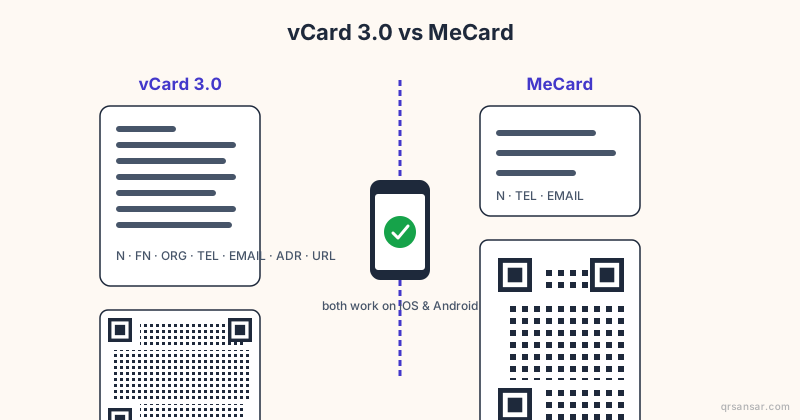
Create a digital business card. Scanning adds the contact directly to the phone. Only name is required — everything else is optional.
Create a calendar event. Scanning adds the event to the phone's calendar app.
End time must be after the start time.
🍎 App Store QR — links directly to your iOS or macOS app listing. Scanning on iPhone opens the App Store. On Android it opens in the browser. Need one QR for both platforms? Try Smart Link.
📲 Google Play QR — links directly to your Android app listing. Scanning on Android opens the Play Store. On iPhone it opens in the browser. Want iOS support too? Try Smart Link.
Paste the full link to your app listing.
🔀 Smart Link — iOS users go to the App Store, Android users go to Google Play, and desktop visitors see a download page with both badges. Must be saved as a Dynamic QR.
Smart Link must be saved as a Dynamic QR — log in to continue.
Shape of the data pixels.
Shape of the 3 finder patterns.
Inner dots inside corners.
Overall shape of the QR code.
Pre-styled designs for specific use cases. Applies colors, shapes, frame & CTA in one click.
One-click color themes. You can further customise after picking a preset.
Keep strong contrast between foreground and background for reliable scanning.
#000000
100%
#000000
100%
#000000
100%
#ffffff
100%
Place a logo at the center of the QR code. Error correction is automatically set to High when a logo is added.
Mula sa feedback button sa tabi ng soap dispenser sa airport ng Bangkok, hanggang sa QR-tagged rhino passport sa Kruger, hanggang sa Mendoza vineyard na nai-scan sa London restaurant — lumalago na library ng real-world places kung saan tahimik na ginagawa ng QR ang trabaho.
✨Kuwento ng araw
🇺🇦
Ukraine · Kyiv to the front lines
An ID that fits in a pocket, even when the office doesn't exist
Ukraine's Diia 'state-in-a-phone' app issues QR-coded digital IDs for driving licences, internal passports, vaccination records, and property documents. Physical government offices have burned, been occupied, or simply lost power. The IDs stayed on citizens' phones and kept working wherever their owners went.
Nag-e-expire ba ang QR codes na ginawa sa QRSansar?
Hindi. Ang static QR codes ay ginagawa sa iyong browser at hindi nag-e-expire — gumagana sila habambuhay. Ang dynamic QR codes na naka-link sa uploaded documents ay nananatiling active habang active ang iyong account.
Is QRSansar free to use?
Yes. All QR code types and customization options are 100% free. Download as PNG, JPG, or SVG with no sign-up. A free account (no credit card) unlocks PDF and WEBP downloads, logo uploads, dynamic QR codes, and up to 10 document uploads. Premium adds bulk generation and analytics.
Pwede ko bang idagdag ang logo ko sa QR code?
Oo. Mag-upload ng kahit anong PNG o SVG logo sa Customize panel. Automatic na ina-adjust ng QRSansar ang error correction para manatiling scannable ang code.
Anong image formats ang maaari kong i-download?
PNG, SVG, PDF, at WEBP. Ang SVG ay ideal para sa print — sumesukat ito sa kahit anong laki nang walang pixelation.
Pwede ko bang i-update ang QR code matapos i-print?
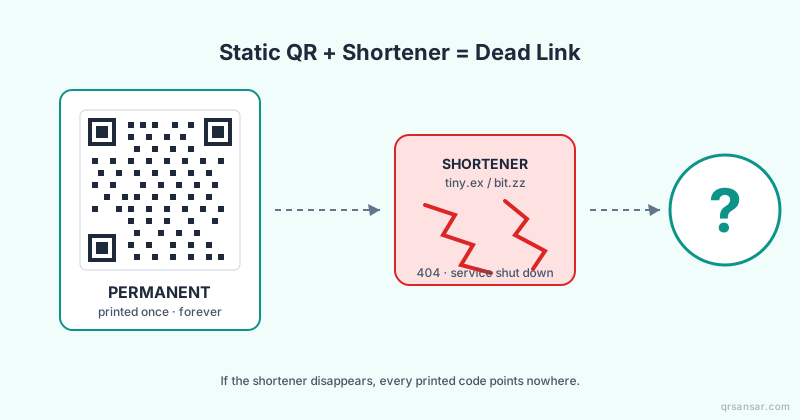
Sa Document QR, maaari mong palitan ang file kahit kailan — ang naka-print na link ay nananatiling pareho. Ang mga static QR code ay nag-e-encode ng data nang direkta at hindi mababago matapos magawa.
Safe ba ang QRSansar QR codes para sa commercial use?
Oo naman. Walang watermarks, restrictions, o fees. Ang QR codes na ginagawa mo ay sa iyo at maaaring gamitin nang malayang sa kahit anong layunin.
Gumagamit kami ng cookies para sa analytics at para mapabuti ang iyong experience. Alamin pa
Manatiling updated!
Maabisuhan tungkol sa mga bagong feature at update mula sa QRSansar.
I-install ang QRSansarI-tap ang tapos "Add to Home Screen"